The installed harness
System architecture shows the capture pipeline: hooks, transcript, watcher, server, event store. That picture is correct, and it is not the whole install. kcap setup also wires six MCP servers, ten skills, and several session-start context injections into your coding agent — a full agent workflow, not just observability.
This page is the complete map: every file the installer writes, everything injected into your agent’s context, every tool your agent gains, what happens server-side, and what flows back into the next session. It is written for readers who will inspect the install — diff their home directory, read the injected context, and ask what each piece is for. Nothing here is hidden elsewhere; this is the same inventory kcap uninstall works from.
Everything below describes the currently released CLI and is told once for one agent, Claude Code. The other eight supported agents get the same harness through different mechanisms — the differences table covers them.
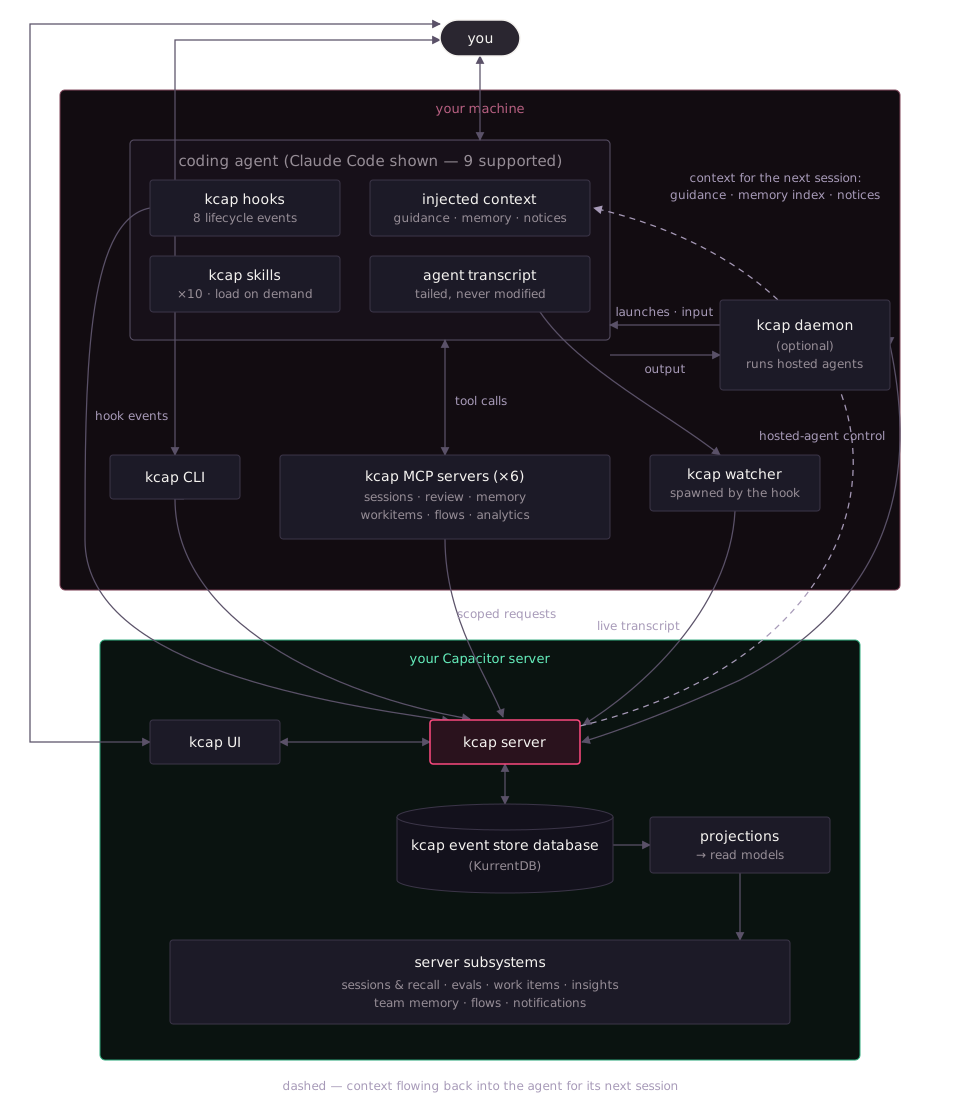
The dashed edge is the one no other diagram shows: context flowing back into the agent. That loop is the point — what sessions produce (mined guidance, the team memory agents saved, live coordination state) flows back in at the next session start.
What kcap setup installs
Section titled “What kcap setup installs”Setup asks one consent question per machine — “Install kcap for these agents (hooks, skills, instructions, MCP)?” — or, when you use the browser first-run flow, records a per-agent answer with two independent axes: Record (capture) and Tools (MCP). Every artifact it writes is listed below with its path. Each is marker-owned, so kcap uninstall removes exactly this set and nothing else.
For Claude Code, the entire integration is one plugin registration:
| Artifact | Path | What it does |
|---|---|---|
| Plugin registration | ~/.claude/settings.json — extraKnownMarketplaces.kcap + enabledPlugins["kcap@kcap"] | Points Claude Code at the plugin directory inside the npm package. Everything else Claude-side comes from the plugin bundle. |
| Version marker | ~/.claude/.kcap-plugin-version | Lets kcap status and upgrades detect what is installed. |
| Hooks | plugin bundle hooks/hooks.json | Eight lifecycle events — the full list is below. Each runs kcap hook --claude, which posts the event to your server. |
| MCP servers | plugin bundle .mcp.json | Six servers, detailed below. npm’s postinstall rewrites the command to the absolute path of the native binary. |
| Skills | plugin bundle skills/ | Ten skills, surfaced to the agent as kcap:<name> — list below. |
| Session-id script | plugin hooks/persist-session-id.sh (SessionStart) | Exports KCAP_SESSION_ID into the agent’s shell environment so terminal commands in the session can name it. |
| Title script | plugin hooks/set-title-prompt.sh (UserPromptSubmit) | Once per session, asks the agent to run kcap set-title so the dashboard shows a human title. |
kcap does not edit CLAUDE.md or any other instructions file for Claude Code. (Five other agents get a marker-delimited steering block — see the differences table.)
Off to the side of any one agent, setup also writes the CLI’s own state:
| Artifact | Path | What it does |
|---|---|---|
| Profile | ~/.config/kcap/config.json | Server URL, default session visibility, daemon name, feature toggles. |
| Tokens | ~/.config/kcap/tokens/ | Your login token, shared by the CLI, hooks, watcher, and daemon. |
| Watcher state | ~/.config/kcap/watchers/ | Pid, heartbeat, and marker files for live-session watchers. |
The six MCP servers
Section titled “The six MCP servers”All six run locally as kcap mcp <name> and translate the agent’s tool calls into authenticated requests against your Capacitor server — reads are filtered by your session-visibility permissions, and writes act as you. Your agent sees roughly 35 tools.
| Server | Tools | Writes? | Plan |
|---|---|---|---|
kcap-sessions | search_sessions, get_session_summary, get_session_transcript, list_turns, get_turn | read-only | all plans |
kcap-review | get_pr_summary, list_pr_files, get_file_context, search_context, list_sessions, get_transcript | read-only | all plans |
kcap-memory | search_memories, get_memory, save_memory, update_memory, rescope_memory, archive_memory | writes memories | all plans |
kcap-workitems | declare_work_item, get_session_work_items, declare_work_breakdown, retract_work_breakdown, declare_work_relation, retract_work_relation, get_work_item_topology | writes work-item state | Team+ |
kcap-flows | start_review_flow, submit_review_round, get_review_flow_status, close_review_flow, start_flow, send_to_participant, get_flow_status, close_flow, list_reviewer_vendors | launches agents — never auto-approved | all plans (runs on your own daemon) |
kcap-analytics | get_analytics_schema, query_analytics | read-only | Team+ |
Two more MCP servers exist in the binary but are deliberately not registered into your agents: kcap mcp judge (session-quality tooling, manual use only) and kcap mcp flow-result (injected by the daemon into hosted reviewer agents only — it is how a reviewer returns its verdict, and a normal session never has it).
The ten skills
Section titled “The ten skills”Skills are instruction documents your agent loads on demand — they add no background behavior and run nothing until invoked in a session.
| Skill | What it triggers on |
|---|---|
recap | Read, search, or recall past sessions (“what did we do last time?”). |
errors | Extract the tool errors and failures from a recorded session. |
validate-plan | Check every item of the session’s plan was actually completed. |
review-flows | Run a structured review loop with a separate reviewer agent until sign-off. |
agent-flows | Run any named flow definition with a hosted participant agent. |
suggest-review-flow | Offer (never auto-start) an independent second-agent review when work wraps up. |
work-items | Declare a work item’s breakdown and dependencies (Team+ — calls kcap-workitems). |
guided-tour | A product tour for someone who just installed kcap. |
hide | Set the current session’s visibility to owner-only. |
disable | Stop recording, or delete the current session. |
The session lifecycle
Section titled “The session lifecycle”Session start: what fires, and what gets injected
Section titled “Session start: what fires, and what gets injected”When you start a session, Claude Code fires the SessionStart hook. The hook command spawns the watcher first — before any network call, so capture never depends on the server being reachable — then posts to your server and writes one additionalContext envelope back into the agent’s context.
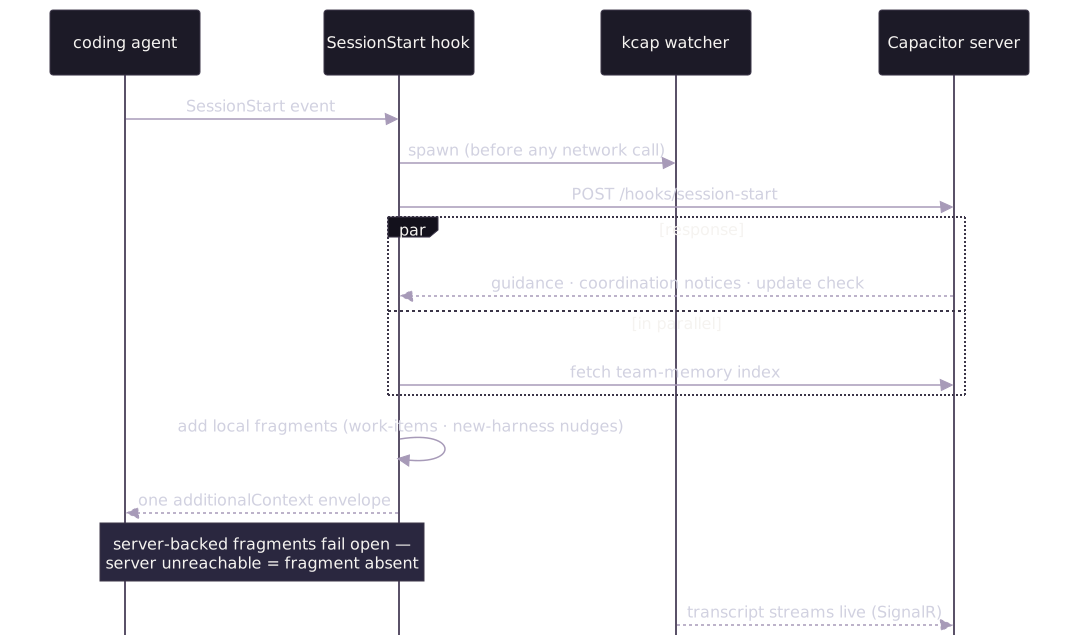
The envelope is assembled from up to six fragments. Each is individually removable via kcap config set (the disable_* keys take true; update_check takes false), and the server-backed fragments fail open — if the server is slow or down, they are simply absent and your session starts normally.
| Injected fragment | Contents | Opt-out key |
|---|---|---|
| Guidance from past sessions | Recurring patterns mined from your team’s previous sessions in this repo — the feedback loop’s output. | disable_session_guidelines |
| Team memory index | An index of your team’s saved memories — slugs and one-line descriptions only, never bodies; the agent fetches a body only when relevant via kcap-memory. | disable_memory_index |
| Coordination notices | Warnings when teammates’ live sessions overlap the same files or work. | disable_coordination_notices |
| Work-items nudge | The session id plus instructions to link the session to the issue or PR being worked on via kcap-workitems. Team+ — the tools it points at are plan-gated. | disable_workitems_nudge |
| New-harness nudge | A one-time offer to set up kcap for a newly detected coding agent (throttled to every 6 h). | disable_harness_nudge |
| CLI-update nudge | A note when your kcap binary is older than what your server recommends. | update_check (set to false) |
That is the complete list. The full injected text is plain markdown — you can read exactly what your agent received in the session transcript on your dashboard.
The full lifecycle event set for Claude Code: SessionStart, SessionEnd, SubagentStart, SubagentStop, UserPromptSubmit, Notification, Stop, and PermissionRequest. Every one runs the same dispatcher (kcap hook --claude), which posts the payload to your Capacitor server’s /hooks/<event> endpoint. PermissionRequest is the outlier: it bridges the agent’s permission prompt to your dashboard and blocks until a human answers there or locally.
During the session
Section titled “During the session”Three things run concurrently while you work:
- Capture. The watcher tails the agent’s own transcript file and streams it to the server over SignalR — prompts, responses, tool calls and results, thinking blocks, token counts. Subagents get their own watchers via
SubagentStart/SubagentStop. The agent’s transcript file is never modified. - Tools. The agent can call the six MCP servers above. Everything they return comes from your server, filtered by session visibility — an agent cannot read a session its user could not see in the dashboard.
- Skills. If you (or the agent) invoke one, it runs inside the session like any other instruction document —
recapsearches history throughkcap-sessions,review-flowsstarts a reviewer throughkcap-flows, and so on.

Session end, and what the server does
Section titled “Session end, and what the server does”SessionEnd stamps the end time and posts it; the watcher notices the agent has exited (it watches the parent process) and reaps itself. Two agents without native end events — Kiro and OpenCode — get a synthesized session-end from the watcher instead.
Server-side, the session is already durable: every captured event was appended to an immutable per-session stream in KurrentDB as it happened. Projections fold those streams into read models, and the subsystems consume them:

- Sessions & recall — the transcript your team browses, replays, and searches; the same data
kcap-sessionsserves back to agents. - Evaluations — configurable automatic evals judge the session (did the agent loop, waste context, fail tool calls?) and post suggestions.
- Work items (Team+) — a signals extractor parses the transcript for issue keys, PR refs, and commit SHAs; correlation ties sessions to tracker items and drives progress views.
- Insights (Team+) — cost, usage, and outcome analytics across sessions; the same governed query API
kcap-analyticsexposes to agents. - Team memory — memories saved during sessions become searchable (full-text + vector) for every future session.
- Flows — if the session started a review flow, the server orchestrates the reviewer rounds through your daemon until sign-off.
- Notifications — session outcomes and collision detection fan out to the in-app inbox and Slack, per your preferences.
The loop closes
Section titled “The loop closes”The next SessionStart in that repo receives the results: mined guidance from what worked and what failed, the updated memory index, and coordination notices about live teammates. That closed loop — capture → process → re-inject — is the workflow kcap actually ships, and it is why the install is larger than a transcript recorder.
Background processes
Section titled “Background processes”Two long-lived processes, both visible in kcap status:
- Watcher — one per live session (plus one per subagent). Spawned by the hook, never by the OS; exits when its session’s agent process exits. State lives in
~/.config/kcap/watchers/. - Daemon (optional) —
kcap daemonkeeps your machine reachable from your server to run hosted agents in isolated git worktrees, and review-flow reviewers, whose workspace mode varies — borrowed checkout, snapshot, or context-only (see Review flows). Installed as an OS service only if you opt in (kcap daemon service install— launchd on macOS, systemd user unit on Linux, Scheduled Task on Windows). Every server-initiated launch is checked against a local consent policy you control (kcap daemon consent), and every decision is logged toconsent-decisions.jsonl. No daemon, no remote execution — the capture pipeline works without it.
Everything else is scoped to a session or shorter: the six kcap mcp stdio servers run as child processes of your agent (one set per session, started and stopped by the agent itself), hook processes run for moments, and a detached helper Claude Code’s session-end spawns so final capture work isn’t cut off by the agent’s hook timeout.
Turning things off
Section titled “Turning things off”The harness is layered, and each layer has its own switch:
- Per injection — the opt-out keys in the table above, via
kcap config set(thedisable_*keys taketrue;update_checktakesfalse). - Per piece, per agent —
kcap setupaccepts--skip-<agent>-mcp,--skip-<agent>-skills, and--skip-<agent>-instructionsflags to install capture without tools, tools without skills, and so on. - Per repository —
excluded_reposstops recording in named repositories. - Per session — the
hideanddisableskills, orkcapCLI equivalents. - Everything —
kcap uninstallenumerates and removes every artifact in the tables above (pass--keep-configto preserve~/.config/kcap), stops watchers and daemons, and removes OS service units.
What’s plan-gated
Section titled “What’s plan-gated”Tier enforcement happens server-side, at the call — the installed harness is identical on every plan, and nothing in the installer is feature-gated. On the Free plan, two of the six MCP servers hit gated endpoints: kcap-workitems and kcap-analytics (each gated as a whole, reads included), and the work-items session-start nudge points at those gated tools. If you are evaluating on Free and see “requires a Team plan” responses, this is where they come from: the work items pipeline and Insights are Team features. Everything else on this page — capture, sessions, recall, memory, review context, flows on your own daemon, evals — works on every plan.
The same harness on other agents
Section titled “The same harness on other agents”The lifecycle above is identical for all nine supported agents; only the wiring differs. Claude Code loads everything from one plugin; the rest get discrete files:
| Agent | Capture mechanism | MCP registration | Skills tree | Steering file |
|---|---|---|---|---|
| Claude Code | plugin hooks (8 events) | plugin .mcp.json | plugin bundle | — |
| Codex | ~/.codex/hooks.json (6 events) | ~/.codex/config.toml | ~/.agents/skills/ | — |
| Cursor | ~/.cursor/hooks.json (8 events) | ~/.cursor/mcp.json | ~/.agents/skills/ | — |
| Copilot CLI | ~/.copilot/hooks/kcap.json (4 events) | ~/.copilot/mcp-config.json | ~/.agents/skills/ | ~/.copilot/copilot-instructions.md |
| Gemini CLI | ~/.gemini/settings.json hooks block (3 events) | ~/.gemini/settings.json | ~/.gemini/skills/ | ~/.gemini/GEMINI.md |
| Kiro | cloned agent ~/.kiro/agents/kcap.json, set as default agent | ~/.kiro/settings/mcp.json | ~/.kiro/skills/ | — |
| Pi | TypeScript extension ~/.pi/agent/extensions/kcap.ts | extension bridge (Pi has no native MCP) | ~/.agents/skills/ | ~/.pi/agent/AGENTS.md |
| OpenCode | plugin ~/.config/opencode/plugins/kcap.ts on the event bus | ~/.config/opencode/opencode.json | ~/.agents/skills/ | ~/.config/opencode/AGENTS.md |
| Antigravity | plugin dir ~/.gemini/config/plugins/kcap/ (5 events) | ~/.gemini/config/mcp_config.json | ~/.gemini/skills/ | ~/.gemini/GEMINI.md (shared) |
Worth knowing before you diff:
- Steering blocks are one canonical text between
<!-- BEGIN kcap -->/<!-- END kcap -->markers — five agents carry one, in four files (Gemini CLI and Antigravity share~/.gemini/GEMINI.md). It tells the agent when to prefer kcap’s context tools (PR summary beforegh pr diff, session search beforegit logarchaeology, memory search before assuming no prior art) and to offer — never auto-start — a second-agent review when work completes. - Kiro’s install is the most invasive: kcap clones your default Kiro agent, adds its hook, and sets the clone as the default (the original is recorded and restored on uninstall). Setup says so before you consent.
- Pi and OpenCode have no shell-hook mechanism, so they get small TypeScript extensions instead; the extension source is right there in the path above.
- All three session-start injection mechanisms (Claude’s hook envelope, JSON-envelope agents, stdout agents) carry the same fragments with the same opt-outs.
Where to go next
Section titled “Where to go next”- System architecture — the capture pipeline picture, and why the store is an event store.
- What Capacitor captures — exactly what data reaches your server, and what never does.
- Setup CLI — install flags, per-agent detection, re-running discovery.
- CLI command reference — every
kcapcommand the harness uses.