System architecture
Kurrent Capacitor (kcap in short) has two halves:
- Your machine — kcap coding agent plugin and watcher captures your agent session from transcript and sends it to the kcap server.
- Your kcap server — Stores your team session captures, processes it, and serves it back as a live dashboard, search, review, suggestions etc. for your coding agent.
New here?
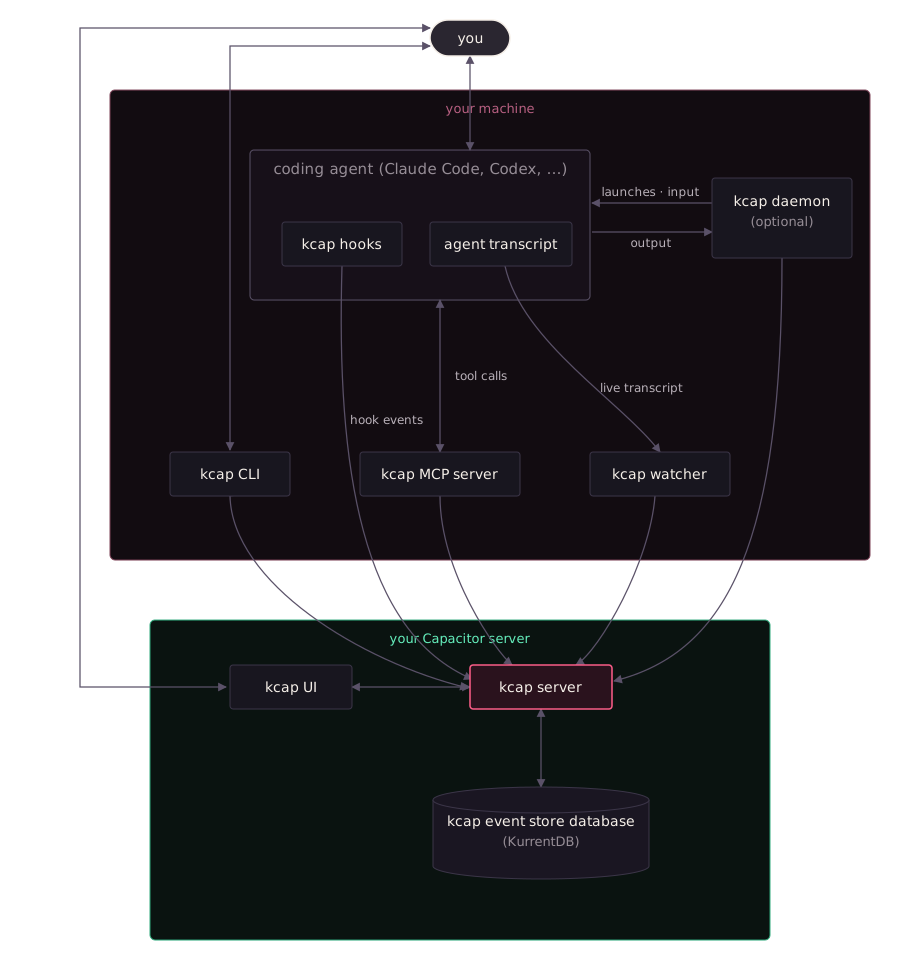
How a session flows
Section titled “How a session flows”Follow one session through the diagram:
- You prompt your agent. Nothing changes about how you work — kcap sits beside your coding agent, not between you and it.
- Agent hook events are sent to kcap Hook events are sent to the kcap server — session started, session ended — and wake the kcap watcher. Capture is automatic once hooks are installed.
- The watcher streams transcript to kcap. The agent writes its transcript as it works; the watcher tails that file and streams it — prompts, responses, tool calls with results, thinking blocks, token counts — to the kcap server as it grows.
- The server appends events to KurrentDB Each session becomes an immutable stream in the KurrentDB event store, and projections keep the read models current — so the session a teammate watches in the kcap UI is the session your agent searches later.
- Context flows back. Your agent queries past sessions and PR context through the kcap MCP server, and the session-start hook pulls repo guidance from the kcap server into the agent’s context.
Components
Section titled “Components”Your machine
Section titled “Your machine”Everything local comes from one npm install: kcap, a single self-contained binary with no runtime dependencies.
| Component | What is it |
|---|---|
| kcap hooks | Plugin that sits inside each supported agent, written by the setup wizard. They fire on session events — start, end — telling the kcap server what happened. Opt-in per agent, and removable. |
| Agent transcript | The session log each agent already writes for itself (~/.claude/projects/, ~/.codex/sessions/, …). The raw record everything is captured from: the agent writes it, the watcher tails it live. Capacitor never writes to it. |
| kcap watcher | A background process that follows the live session. It tails the agent transcript as it grows and streams it to the kcap server, so a teammate watching the kcap UI sees turns as the agent emits them. |
| kcap MCP server | A MCP server your coding agent starts alongside a session. It answers the agent’s tool calls — search past sessions, read transcripts, pull PR context — by querying the kcap server, scoped by repo and author permissions. |
| kcap CLI | The kcap command line tool itself: kcap recap, kcap review, kcap import, and the rest. The half of Capacitor you drive by hand; everything it shows you comes from the kcap server. See the command reference. |
| kcap daemon (optional) | An optional background process that keeps your machine reachable from your Capacitor server. It runs coding agents on your machine on the server’s behalf — hosted agents in isolated git worktrees. Required for certain features. |
Your Capacitor server (cloud)
Section titled “Your Capacitor server (cloud)”Your server lives in the cloud at https://<your-org>.kcap.ai. Kurrent provisions and operates it; you deploy nothing.
| Component | What is it |
|---|---|
| kcap server | It receives what your machine sends — hook events, the watcher’s live stream, the CLI’s commands, the MCP server’s queries, the daemon’s control channel — and it alone writes the event store. In the back, asynchronously processes hook events and transcripts and materializes them to table views for fast retrieval. |
| kcap event store database (KurrentDB) | The source of truth: every captured session as an immutable, append-only event stream. See Why an event store? for more. |
| kcap UI | The web dashboard. Browse repos, sessions, and agents; watch sessions live; view analytics; launch hosted agents. |
Why an event store?
Section titled “Why an event store?”Capacitor is built on event sourcing: the server never updates a session in place. It appends every change — each prompt, tool call, and result — as an immutable event, and derives everything else from that history.
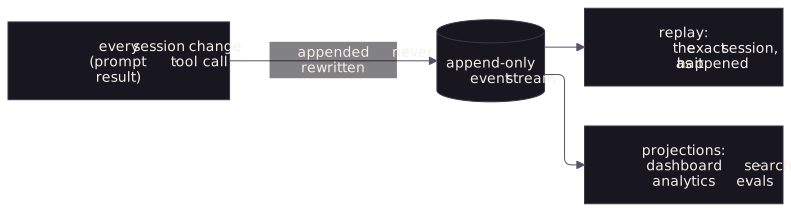
That one decision carries most of what Capacitor promises:
- The record is exact. A coding session is a sequence of things that happened, in order. Events store it that way — nothing overwritten, nothing lost.
- Replay is free. The session you watch in the dashboard is the stored events, not a summary of them. Audit needs no extra machinery.
- It’s fast, both ways. Writes are appends — the cheapest operation a database can do — so capture keeps pace with live sessions. Reads come from read models projected ahead of time for each view.
- New views never touch old data. Search, analytics, and evaluations are projections over the same streams. Adding the next one requires no migration and rewrites nothing.
The store behind this is KurrentDB, the event-native database built by the same team — Capacitor is a sibling product. To go deeper into the practice, start with KurrentDB’s event sourcing overview.
Where to go next
Section titled “Where to go next”- What Capacitor captures — exactly what data reaches your Capacitor server, and what never does.
- Setup Server — the admin’s one-time server setup.
- Setup CLI — install the local half of this picture.
- Your first session — watch the pipeline run end to end.